Your own bot with your server's name
Step by step with pictures: create a Discord application, set its name and avatar, turn on the special intents, paste the token in the dashboard, invite it.
With the Own bot plan, your server gets a bot with the name, avatar and status you choose. It runs every Clanzy feature with the settings you already have: the welcome, intro questions, temp voice rooms, the Shield and the weekly report. Own bot includes everything in Pro. See Pricing.
You need: Manage Server in the server, an active Own bot plan, and about 10 minutes.
Step 1: Create a Discord application
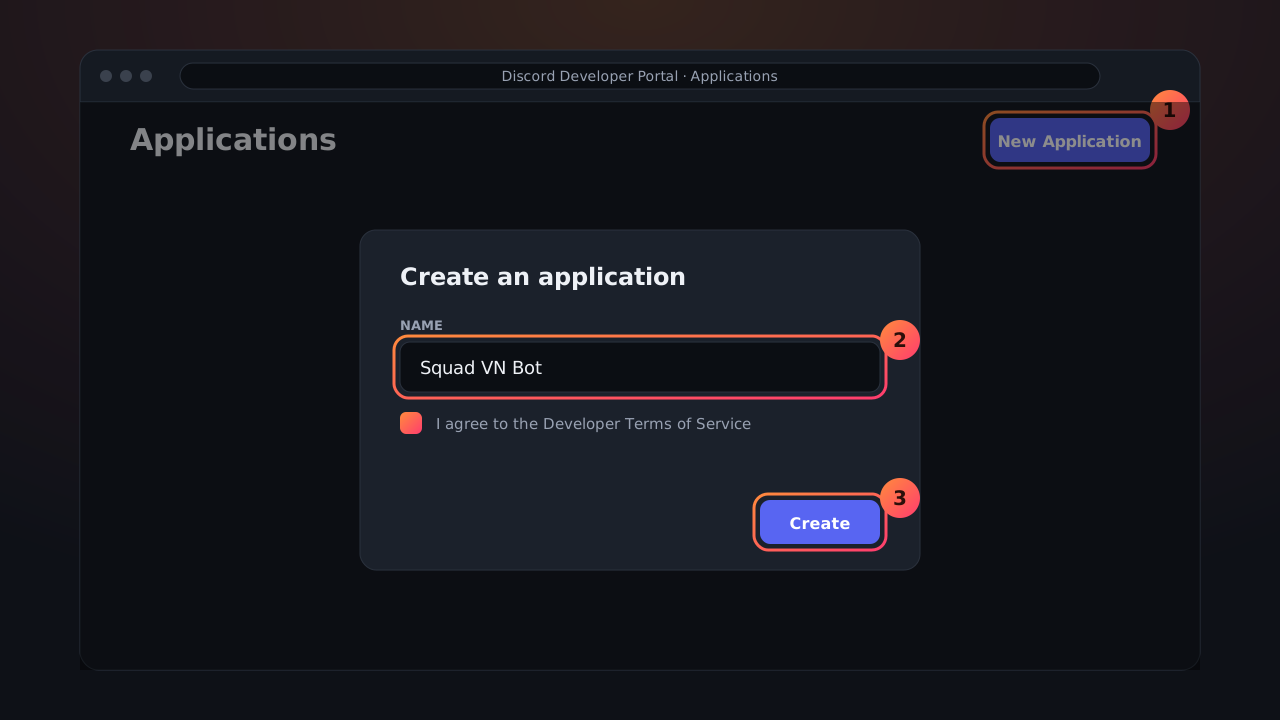
- Open the Discord Developer Portal (discord.com/developers/applications) and log in with your Discord account.
- Press New Application.
- Name it, for example after your server. Accept the terms and press Create.
Step 2: Set the bot's name and avatar
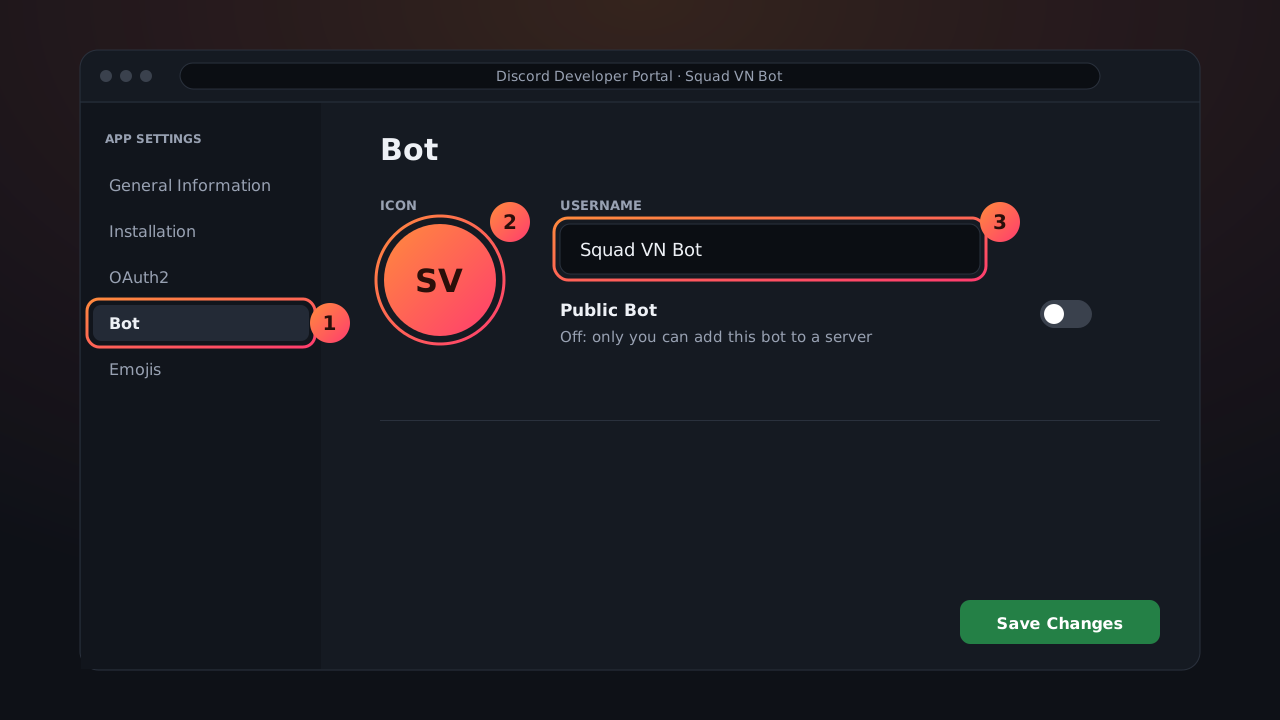
- Open the Bot tab on the left.
- Upload an avatar (your server logo works best) and set the bot's Username.
- Turn Public Bot off so nobody else can add your bot to their server. Discord may ask you to set the Install Link on the Installation tab to None first.
- Press Save Changes.
You can change the name and avatar later, right from the Clanzy dashboard.
Step 3: Turn on the special intents
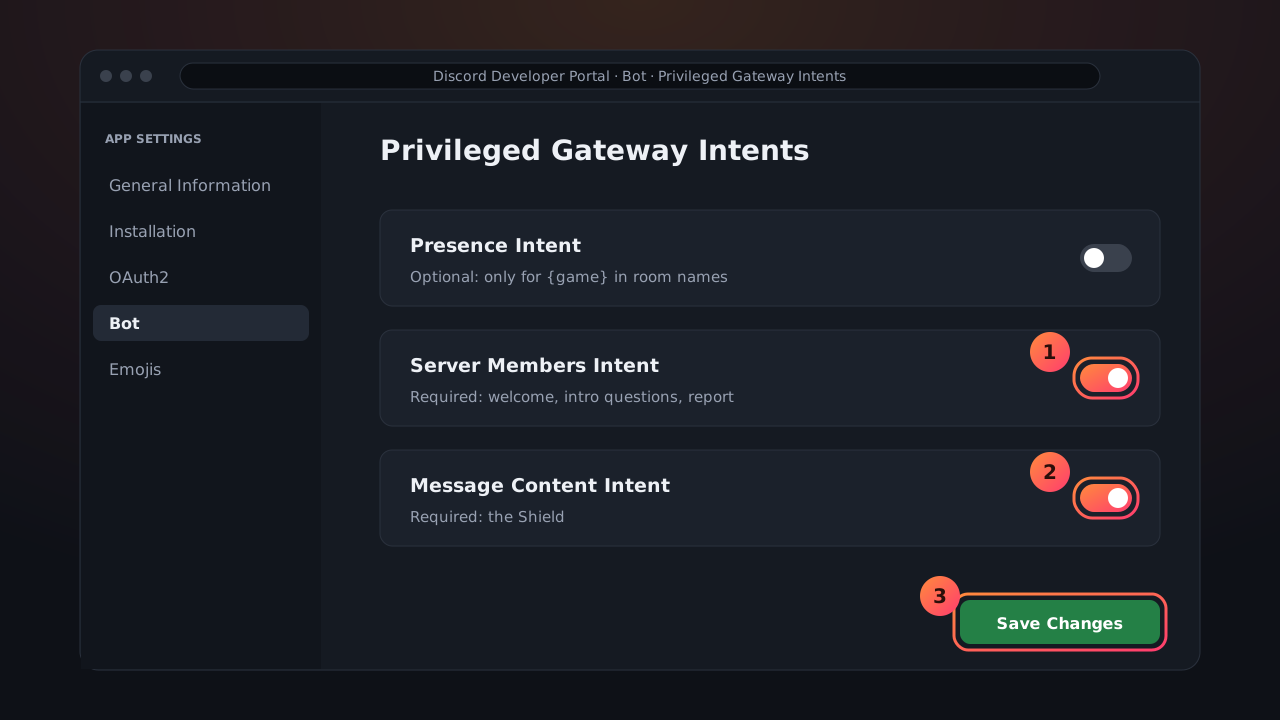
Still on the Bot tab, scroll to Privileged Gateway Intents:
| Switch | Needed | What for |
|---|---|---|
| Server Members Intent | Required | Welcomes, intro questions, the weekly report |
| Message Content Intent | Required | The Shield looking for scam links and bait |
| Presence Intent | Optional | Only when voice room names use {game} |
Switch on the two required ones and press Save Changes.
Step 4: Get the token
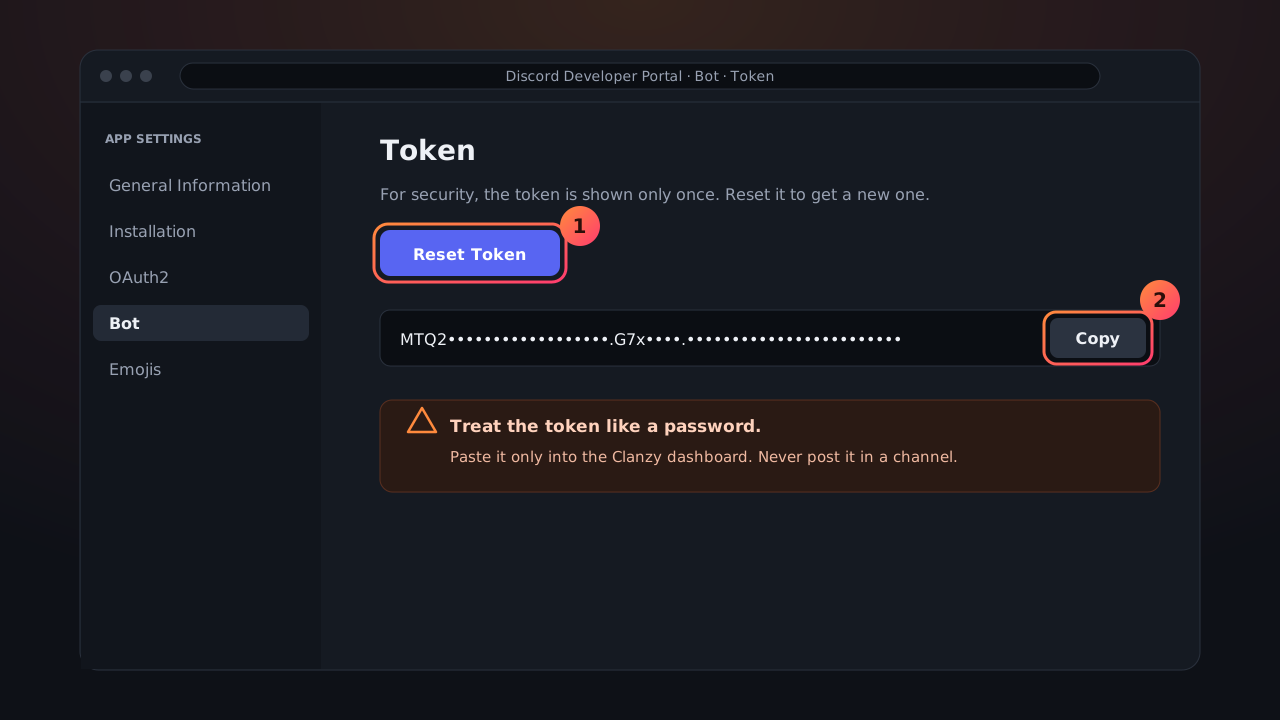
- Still on the Bot tab, press Reset Token and confirm.
- Press Copy. Discord shows the token only once.
Step 5: Paste the token in the dashboard
- Open the Own bot section of the dashboard and pick your server.
- Paste the token. The dashboard checks it as you paste: is it shaped like a bot token, which bot it is, whether another server already uses that bot, whether both intents are on (Clanzy tries to turn them on for you; if it can't, a button opens that bot's Bot tab). Press save: the token is stored encrypted. After that nobody can see it again, you included.
- Set the bot name, About me (up to 400 characters) and status (up to 128 characters). Clanzy applies them to your bot.
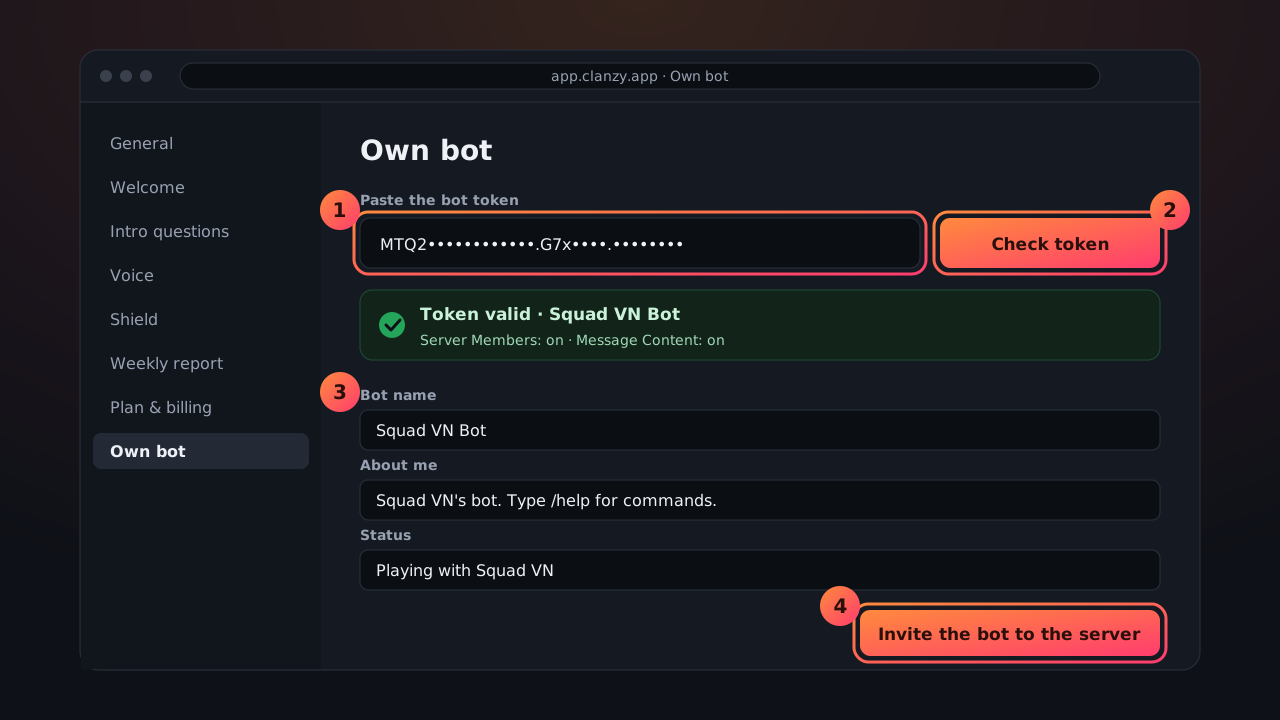
A missing intent or a wrong token is reported right away. See Own bot problems.
Step 6: Invite the bot
Press the invite button in the dashboard. Discord opens its add-bot screen with every permission Clanzy needs, Shield included. Pick your server and press Authorize.
Then drag the new bot's role above your game, gender and Member roles in Server Settings → Roles, just as you did for Clanzy. See Role order for Clanzy.
Step 7: Check the handoff
When your bot joins, it takes over within seconds, with the same settings:
- Your bot shows as online in the member list.
- Run
/setup welcome-test: the welcome card comes from your bot's name and avatar. - Join a hub: the temp room and its control panel come from your bot.
- The dashboard shows your bot as active.
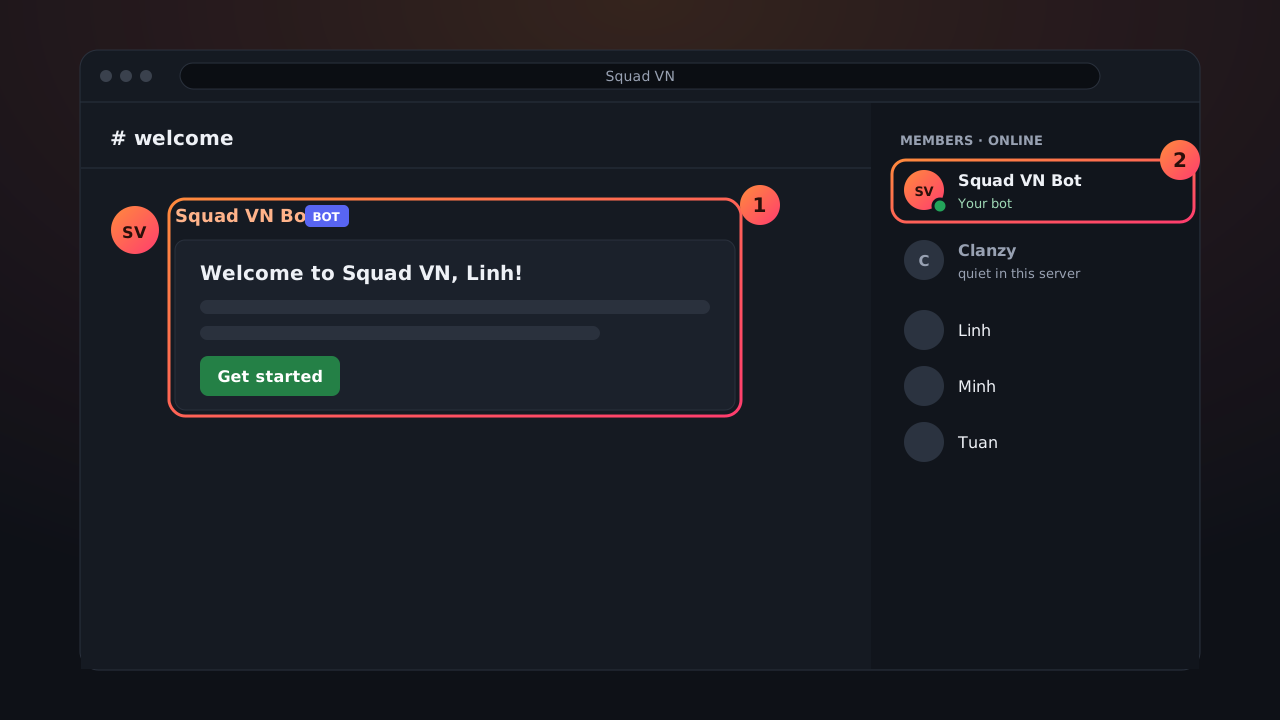
The main Clanzy bot goes quiet in that server: no double welcomes, no double rooms. Anyone who runs a main Clanzy command is told to use your bot's commands.
When something changes
| What happens | What Clanzy does |
|---|---|
| The token is reset or deleted, or the bot is deleted | The main Clanzy bot serves the server again at once and messages the owner to paste a new token |
| You switch from Own bot to Pro | Your bot runs until the end of the month you paid for, then pauses |
| The Own bot plan ends (cancelled, or the card could not be charged) | Your bot pauses, the main Clanzy bot takes over, settings are kept. The token is kept 30 days, then deleted |
| You buy Own bot again within those 30 days | Your bot takes over again, no need to paste the token again |
| You replace the token (leaked, or a new bot) | Press Replace the token in the dashboard and paste the new one |
| You remove Own bot in the dashboard | The token is deleted and the main Clanzy bot takes over, settings are kept |
Every error in detail: Own bot problems. Paying, cancelling and refunds: Plans and billing.
Frequently asked questions
Do I need to know how to code?
No. You press a few buttons on Discord's developer site and paste a token into the Clanzy dashboard. It takes about 10 minutes.
Message Content is a privileged intent. Does Discord have to approve it?
No. Bots in fewer than 100 servers just switch it on. Your own bot lives in one server, so no review is needed.
Can I remove the main Clanzy bot?
Yes, and the dashboard keeps working. It is better to keep it, though: if your bot's token is reset or breaks, the main Clanzy bot steps in at once. Without it, nothing runs in your server until you fix the token.
Updated