Clanzy vs VoiceMaster vs Carl-bot: Which Discord Bot Fits a Gaming Server?
An honest comparison for gaming servers: Carl-bot alternative for welcomes and roles, VoiceMaster alternative for temp voice, and when to keep each bot.
- Author
- The Clanzy team
- Updated
- Reading time
- 7 min read
Short answer
Carl-bot is a general-purpose bot with deep moderation, automod, logging and reaction roles, and no temp voice in its docs. VoiceMaster is a dedicated temp voice bot with more room options than anyone else here. Clanzy covers a gaming server's first three jobs (welcome, game roles, temp voice) with one /setup all, and since November 2026 also free moderation, anti-spam, logs, role panels and voice levels, so many servers can run it alone.
If you run a gaming server, you have probably ended up with a small zoo of bots: Carl-bot for roles and moderation, VoiceMaster for voice rooms, maybe something else for welcomes. This page compares the three on the jobs gaming servers actually need, so you can decide what to keep, what to swap and what to run side by side.
Full disclosure: we make Clanzy. Everything we say about VoiceMaster and Carl-bot comes from their own public docs and websites (November 2026), and we say plainly where they are stronger.
The short version
- Carl-bot is a general-purpose bot: reaction roles, autoroles, welcome and leave messages, automod, moderation, logging, tags (custom commands), levels, starboard, suggestions and feeds. Its docs list no temp voice feature.
- VoiceMaster does one thing, join-to-create temp voice, and goes deep on it: permit and reject lists, bitrate, room text channels, channel status, several room-naming setups.
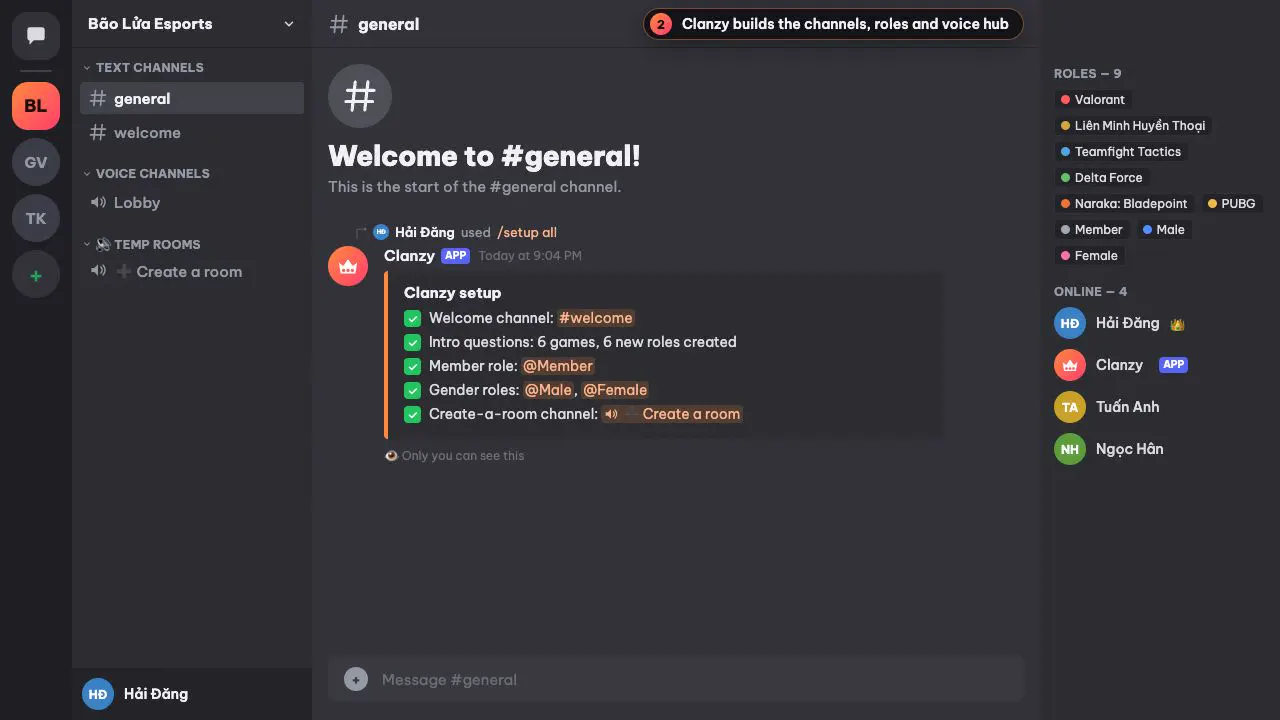
- Clanzy handles the first three things a gaming server needs with one
/setup all: a welcome card with a Get started button, intro questions that hand out game roles, and a ➕ Create a room hub. It defaults to Vietnamese with English available and never asks for Administrator. It also covers everyday moderation (warn, timeout, kick, ban, purge, case history, warn rules), anti-spam and anti-raid, server logs, button role panels and voice levels that count in temp rooms, all on the free plan.
Feature comparison
"Not in docs" means we did not find the feature in that bot's public docs or website (November 2026). It does not prove the bot can't do it.
| Feature | Clanzy | VoiceMaster | Carl-bot |
|---|---|---|---|
| Welcome message in a channel | Yes | Not in docs | Yes |
| Welcome DM | No | Not in docs | Yes |
| Role for everyone on join (autorole) | Partly | Not in docs | Yes |
| Emoji reaction roles | No | Not in docs | Yes |
| Button or menu role panels | Yes | Not in docs | Yes |
| Intro questions that assign game roles | Yes | Not in docs | Not in docs |
| Join-to-create temp voice rooms | Yes | Yes | Not in docs |
| Owner lock, hide, rename, limit, claim, transfer | Yes | Yes | Not in docs |
| Bitrate, room text channel, channel status | No | Yes | Not in docs |
| Warn, timeout, kick, ban, case history | Yes | Not in docs | Yes |
| Anti-spam (invites, links, mentions, floods) | Yes | Not in docs | Yes |
| Server logs | Yes | Not in docs | Yes |
| Levels and XP | Yes, free, voice XP counts in temp rooms | Not in docs | Yes (paid plan) |
| Custom commands, starboard | No | Not in docs | Yes |
| One command sets up welcome, roles and voice | Yes | Partly | Partly |
| Web dashboard | Yes | Yes | Yes |
| Vietnamese by default | Yes | Not in docs | Not in docs |
| Paid plan | Yes | Yes | Yes |
The "Partly" cells: Clanzy gives its Member role when a newcomer finishes the intro questions, not the moment they
join. VoiceMaster's /setup commands build the voice side only. Carl-bot has setup helpers per module (such as
/reactionrole setup and /modlog create) rather than one command for everything.
Welcome messages
Carl-bot's greetings are flexible. You set a welcome channel, optionally DM the member, and use variables like
{mention}, {server} and {server(members)}, plus Tagscript for more logic. It also does leave and ban messages;
per its docs, a dedicated farewell channel is a Premium command. If you want a highly scripted welcome, Carl-bot does
more than Clanzy.
Clanzy posts a welcome card with a Get started button. You write the text on the dashboard with {user},
{username}, {server} and {memberCount}. The difference is what happens next: the button opens the intro
questions, so the greeting leads straight to roles. With membership screening on, Clanzy waits until the newcomer
accepts the rules and welcomes them once. More in our Discord welcome bot guide.
VoiceMaster's site does not cover welcomes.
Roles
Carl-bot's reaction roles are the most complete of the three. Each message can be unique (one role at a time), verify (add only), binding, or drop, with limits on how many roles a member takes and how many people can hold a role. Add autoroles, delayed roles, and sticky roles for members who rejoin within 30 days. If you need those rules, Carl-bot is the stronger choice.
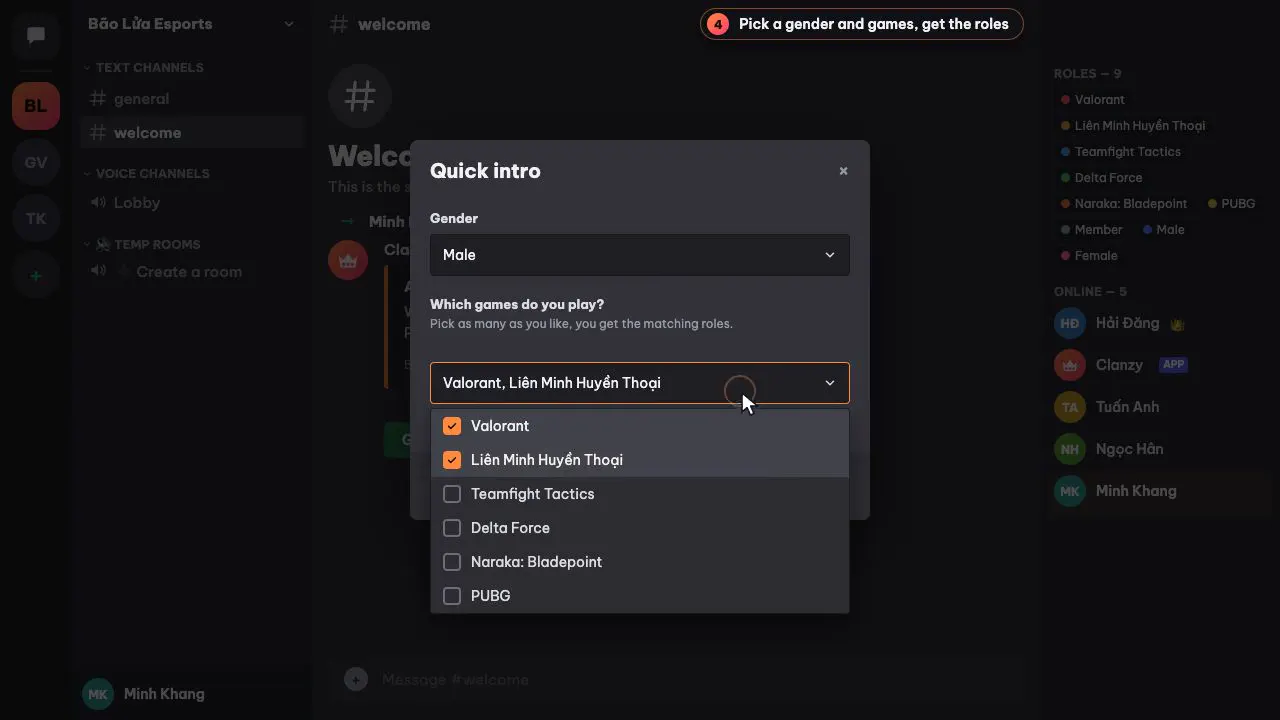
Clanzy takes a different route: newcomers press Get started, choose a gender (optional) and the games they play
from a menu, up to 25 games. Picked games add roles, unpicked games remove them, and /roles lets anyone change their
answers. Every newcomer sees the question in the welcome card. The
auto role guide walks through the setup. For rank, region or ping roles, Clanzy
also posts self-role panels with buttons or a select menu, one choice or several, with an
optional maximum.
Temp voice
This is VoiceMaster's home turf. Per its site, room owners can lock, ghost (hide), rename, limit, claim and transfer, and also permit or reject specific users or roles, change bitrate and region, set a channel status, send invites, and open a text channel private to the room. Admins choose between a free default setup, paid Sequential, Predefined and Clone setups, and a newer Dynamic setup. If your server lives in voice and wants that control, VoiceMaster offers more than Clanzy.
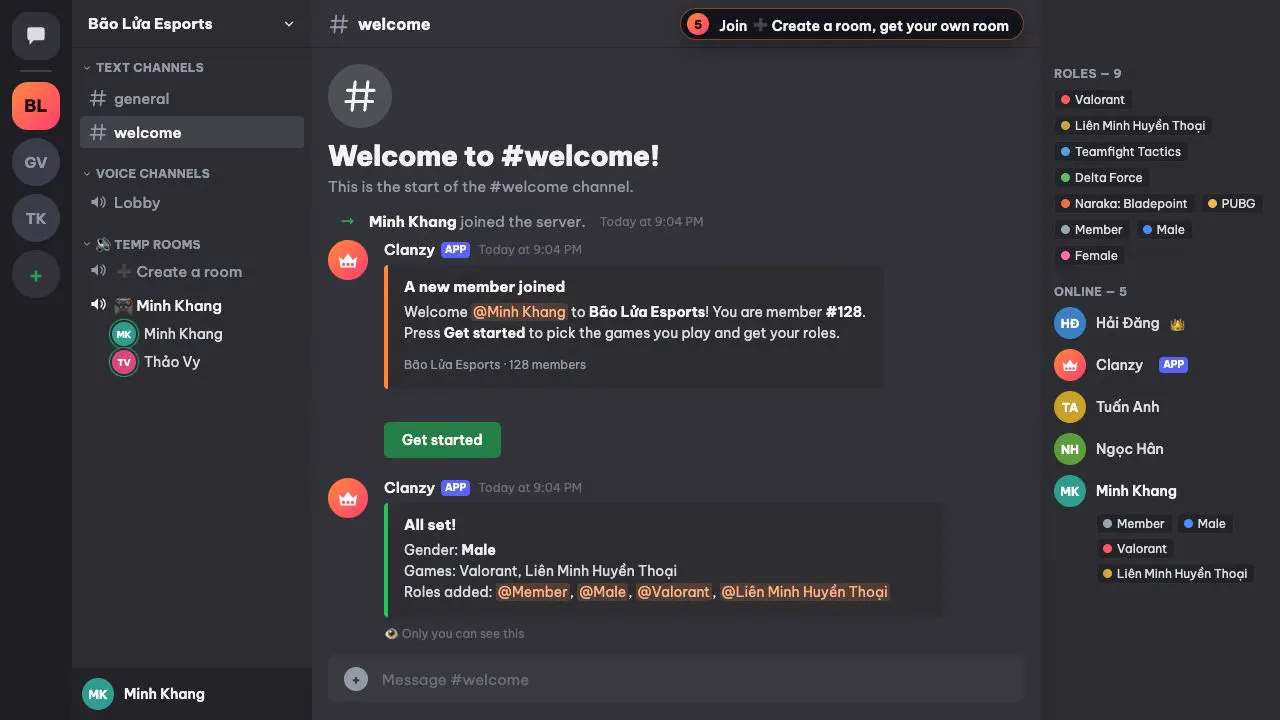
Clanzy covers the core flow. Join ➕ Create a room and you get a room named after you (template 🎮 {displayName},
editable on the dashboard), with a button panel to lock, hide, rename, set a limit, claim, transfer ownership or kick.
Kicked members are blocked from rejoining. Everything also works as /voice ... commands, and rooms delete
themselves once they have been empty for 2 minutes, so a member whose console or phone drops can rejoin. Time in temp
rooms counts toward Clanzy's free voice levels. The free plan includes one hub.
Carl-bot's docs show voice logging (joins, moves, leaves) but no temp voice rooms.
Permissions and privacy
Clanzy asks for manage channels, manage roles, view channels, send messages, embed links, read message history, connect and move members, plus the moderation permissions (timeout, kick and ban members, manage messages, view audit log). It never asks for Administrator, never acts on admins, and never stores message content. VoiceMaster's official invite link does not request Administrator either. For Carl-bot, check the permission list on the invite screen; a moderation bot needs permissions like kick and ban to do its job.
When to pick which
Pick Carl-bot if you need custom commands (tags), starboard, emoji reaction roles with many rules or its deeper automod. Clanzy now covers everyday moderation, anti-spam, logs and role panels, but not those.
Pick VoiceMaster if voice is the center of your server and members want fine control: permit lists, bitrate, room text channels, numbered rooms.
Pick Clanzy if you are building a gaming server, or cleaning one up, and want welcome, game roles, temp voice, moderation, logs and voice levels from one bot set up in minutes, with copy that reads naturally in Vietnamese or English.
Run two together only if you need something Clanzy lacks, like Carl-bot's tags. Turn off the duplicate modules (welcome, logs) in one of them so newcomers are not greeted twice.
How to switch
From VoiceMaster or another temp voice bot
- Add Clanzy with the Add to Discord button at the top of this page.
- Type
/setup voiceto create a 🔊 Temp rooms category and a ➕ Create a room hub. - Try it for a few minutes: join the hub, check the room and its control panel.
- Delete the old bot's hub. Rooms with people in them stay until everyone leaves.
- Remove the old bot if you don't use it for anything else.
If you run several hubs today, note that Clanzy's free plan has one.
From Carl-bot welcomes and game reaction roles
- Type
/setup all(or/setup onboarding). Existing roles with the same name are reused when Clanzy can assign them. - On the dashboard, map each game to your existing game role.
- In Server Settings → Roles, drag the Clanzy role above those game roles.
- Turn off Carl-bot's welcome message in its dashboard.
- Run
/setup welcome-testand press Get started to try it as a newcomer. - Run
/setup logsfor a mod log channel and set your warn rules in the dashboard. Keep Carl-bot only for features Clanzy lacks.
Every slash command is on the Clanzy commands page, and the Pro and Own bot plans are on pricing.
Sources (checked November 2026): Carl-bot docs at docs.carl.gg (Greetings, Roles, Logging, Premium); VoiceMaster's homepage and setup guide at voicemaster.xyz.
Questions people ask
Is Clanzy a full Carl-bot alternative?
For most gaming servers, yes. Clanzy covers welcomes, game roles, button role panels, warn/timeout/kick/ban with case history and warn rules, anti-spam, logs and voice levels, all free. It has no tags (custom commands), starboard or social feeds, and Carl-bot's reaction-role rules and automod go deeper. If you rely on those, keep Carl-bot for them.
Does Carl-bot have temp voice channels?
Not according to its public docs (November 2026). It logs members joining, moving between and leaving voice channels, but has no join-to-create rooms.
Is Clanzy a good VoiceMaster alternative?
For the core flow, yes: join a hub, get your own room, lock, hide, rename, limit, claim, transfer or kick with buttons. VoiceMaster offers more room options, such as bitrate, permit lists, room text channels and numbered rooms.
Can I run Clanzy alongside Carl-bot or VoiceMaster?
Yes. Turn off the welcome message in one bot so newcomers are not greeted twice, and use only one join-to-create hub per room setup.
How much does Clanzy cost?
Welcome messages, intro questions, game roles, temp voice, moderation, anti-spam, logs, role panels and voice levels are free. The free plan includes one create-a-room hub and up to 25 onboarding games.
Keep reading
Discord Welcome Bot: Set Up a Welcome Channel That Actually Helps
Set up a Discord welcome bot: compare Discord's built-in welcome messages with a bot, write a custom message, handle membership screening and test it.
5 min read
Discord Auto Role Bot: Join Roles, Reaction Roles and Role Questions
How to give roles automatically on Discord: join roles, reaction roles, button and question-based roles, Discord Onboarding, and fixing role hierarchy errors.
5 min read